
How the MultiVM Token Standard (MTS) represents a unified balance across every layer of the Injective stack, the four valid ways to instantiate or bridge tokens, and how to avoid common pitfalls during the process.
Injective's architecture includes two VMs (EVM and Wasm) that operate on top of the native execution layer where core modules that handle exchange and banking logic are deployed. In other ecosystems, tokens from differing origins are wrapped. However, on Injective, tokens are represented natively across either VM and the execution layer. This reduces the complexity of using tokens across execution environments.
Under MTS, a single canonical balance is maintained regardless of whether a transaction uses the EVM or native execution layer, and whether the token was created on Injective or bridged from Ethereum or another IBC chain. This post covers how this works, each of the possible ways to deploy or bridge a token on Injective, and how to avoid mistakes along the way. Routing assets through various bridge providers is a separate topic and will also be covered in an upcoming post.
The model: one balance, two views
For MTS tokens, the native bank module on the execution layer is the single source of truth for balances and total supply. ERC20 tokens that need their balances accessible through Injective’s native bank module must read and update bank state through the bank precompile deployed at 0x64. The precompile resolves the denom in one of two ways. For tokens originating on the native execution layer, whether created through TokenFactory or bridged via Peggy or IBC, it reads an explicit ERC20 module mapping. For tokens deployed directly on Injective EVM against the BankERC20 interface, it derives the denom as erc20:0x....
TokenFactory, Peggy and IBC bridged tokens only need explicit pairing if they also need an ERC20 representation. Vanilla ERC20 contracts maintain independent balances in EVM contract storage. The native bank module does not track those balances and they remain outside the scope of MTS.
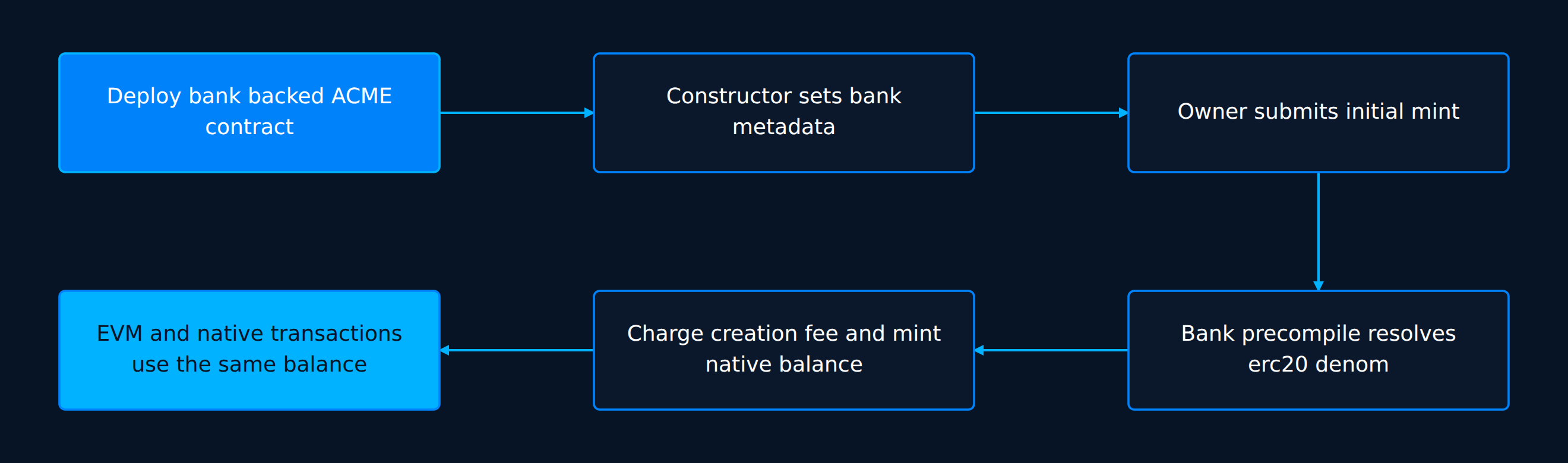
The most important property of the MTS tokens is that a native bank send transaction and an ERC20 transfer on the Injective EVM move the same balance. For a detailed walkthrough, watch the Build Onchain with Injective's EVM Toolkit, which demonstrates deploying a BankERC20 token with Foundry, and a send transaction on the native side reflecting in the account's EVM balance immediately.
When pairing a TokenFactory denom with a custom erc20Address , it’s critical to verify that the contract reads and updates through the bank precompile, as Injective’s BankERC20 does. Pair creation does not validate proper implementation, so a vanilla OpenZeppelin ERC20 can pass validation while still maintaining balances independent of the native bank module. Correcting such a divergent pair requires governance to remove the mapping through MsgDeleteTokenPair, followed by a new registration of a compatible contract. Simply deleting the mapping does not automatically reconcile existing balances.
Four Valid Paths for Token Creation
There are four valid paths to token creation on Injective: new native tokens created via TokenFactory, Ethereum ERC20s bridged through the EVM bridge Peggy, tokens incoming via IBC, and tokens deployed directly on Injective's EVM.
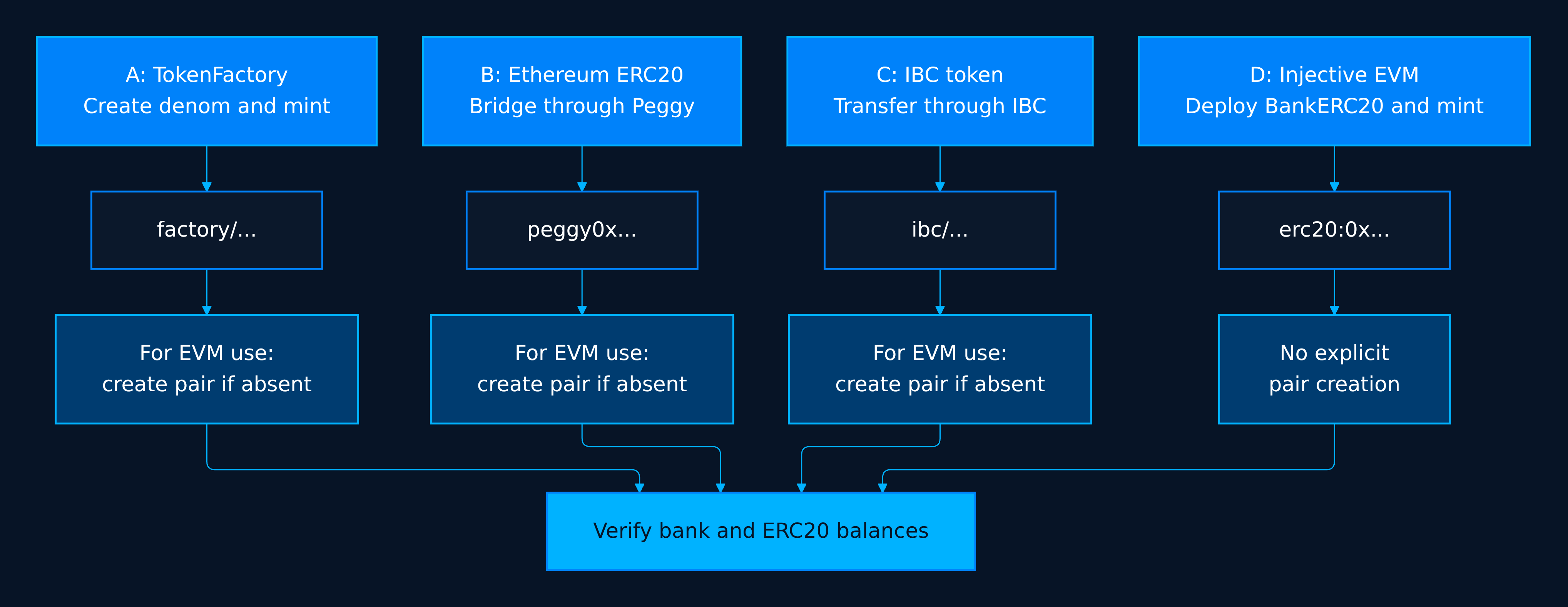
Each path produces a native bank denom: factory/... , peggy0x... , ibc/... or erc20:0x... . Paths A through C require an explicit ERC20 pair only for EVM use. Path D requires no explicit pair creation since the bank precompile derives the denom directly from the BankERC20 contract address.
Metadata update authority differs by origin. Additionally, before executing MsgCreateTokenPair for paths A through C, ensure that the denom has a nonzero supply. The transaction will otherwise fail with ErrUnknownBankDenom.
Path A: New native token via TokenFactory
If launching a token that doesn't exist elsewhere (and doesn't need to be), then deploying via TokenFactory is the recommended path. The denom admin or governance can create the token pair. This can also mitigate the potential for another entity to frontrun or squat the token pair.
Creating a token via TokenFactory involves three steps:
- Initialize the bank denom by executing
MsgCreateDenomand specifying the name, symbol and decimals for it. The sender pays the denom creation fee in addition to the transaction fees. Query/injective/tokenfactory/v1beta1/paramsfor the exact fee (see Swagger). - Mint an initial supply by executing
MsgMint - Register the ERC20 representation by executing
MsgCreateTokenPair
Submit all three messages in one atomic transaction, or submit them separately in order. A combined transaction ensures denom creation, minting and pairing succeed together. Separate transactions can leave a native token without an ERC20 representation if pairing fails.
CLI Example
ADMIN=$(injectived keys show admin -a)
CHAIN_ID="injective-888"
NODE="https://sentry.tm.testnet.injective.network:443"

# Required: validated gas limit and transaction fees
# Illustrative gas limit: confirm for the combined transaction
GAS_LIMIT=3500000
# Example gas price
GAS_PRICE_INJ_BASE=500000000
# Transaction fee in base inj units: gas limit × gas price
FEE_AMOUNT_INJ_BASE=$((GAS_LIMIT * GAS_PRICE_INJ_BASE))
# Result: 1750000000000000 base inj = 0.00175 INJ

# generate each message unsigned
injectived tx tokenfactory create-denom acme "Acme Token" ACME 6 \
  --allow-admin-burn \
  --from admin --chain-id "$CHAIN_ID" --generate-only > msg1.json
injectived tx tokenfactory mint 1factory/$ADMIN/acme $ADMIN \
  --from admin --chain-id "$CHAIN_ID" --generate-only > msg2.json
injectived tx erc20 create-token-pair factory/$ADMIN/acme \
  --from admin --chain-id "$CHAIN_ID" --generate-only > msg3.json

# Merge the messages and set gas limit and transaction fee
jq -s \
  --arg gas "$GAS_LIMIT" \
  --arg fee "$FEE_AMOUNT_INJ_BASE" \
  '
  .[0].body.messages = (map(.body.messages) | add)
  | .[0]
  | .auth_info.fee.gas_limit = $gas
  | .auth_info.fee.amount = [{"denom": "inj", "amount": $fee}]
  ' \
  msg1.json msg2.json msg3.json > create-acme.json

# sign once, broadcast once
injectived tx sign create-acme.json \
  --from admin \
  --chain-id "$CHAIN_ID" \
  --node "$NODE" > signed.json

injectived tx broadcast signed.json \
  --node "$NODE"
This example uses an existing admin key in your injectived keyring on Injective testnet. Generate the three unsigned messages with --generate-only , merge them into create-acme.json and set the auth_info.fee.gas_limit and auth_info.fee.amount. Then sign and broadcast the combined transaction, passing the testnet chain ID and native RPC endpoint.
This example uses a gas limit of 3,500,000. Before submitting, simulate the combined three message transaction using POST /cosmos/tx/v1beta1/simulate and multiply the returned gas_used by 1.3 for headroom. Adjust the example’s gas limit and transaction fee to match your chosen limit.
The ERC20 template deployment has a 2,000,000 EVM gas cap. This is separate from the total transaction gas, which also covers denom creation, minting and ante handler processing.
Omitting the ERC20 address deploys MintBurnBankERC20, with the pair creator as the owner. If the denom has a permissions namespace that disables MINT, BURN, or SUPER_BURN, then the chain deploys FixedSupplyBankERC20 and rejects any custom contract address.
For a custom contract, extend BankERC20 and deploy your implementation with name="", symbol="" and decimals=0. This prevents the constructor from creating metadata for a separate erc20:0x... token. Pair creation fails with ErrExistingERC20DenomSupply if that contract already has erc20:0x... metadata or supply. After pairing, the contract uses the factory denom’s metadata and bank balances.
Minting through MintBurnBankERC20 requires authorization at both the contract and native module levels. The caller must be the ERC20 owner, while the contract address must pass TokenFactory’s mint authorization because the precompile uses it as the mint request’s sender:
- Without a permissions namespace, the contract address must be the denom admin.
- With a permissions namespace, the contract address must have
MINTpermission. Being the denom admin is not sufficient.
To burn a holder’s tokens through the paired ERC20, the denom must have been created with --allow-admin-burn. The bank precompile submits the burn request with the contract’s address as sender and the holder’s address as the burn target. If the denom has no permissions namespace, the contract’s address must be the denom admin. If the denom has a permissions namespace, the contract’s address must have SUPER_BURN permission. BURN permission alone does not authorize the contract to burn another account’s tokens.
Admin burning cannot be enabled after denom creation, but it can be disabled later.
Changing the TokenFactory denom admin does not change the ERC20 owner. Transferring ERC20 ownership does not change the denom admin.
Path B: an ERC20 on Ethereum, bridged through Peggy
The original token was deployed as an ERC20 on mainnet Ethereum. It can be bridged via Peggy, Injective's canonical Ethereum bridge. Doing this will lock the tokens on Ethereum and mint the native bank denom on Injective:
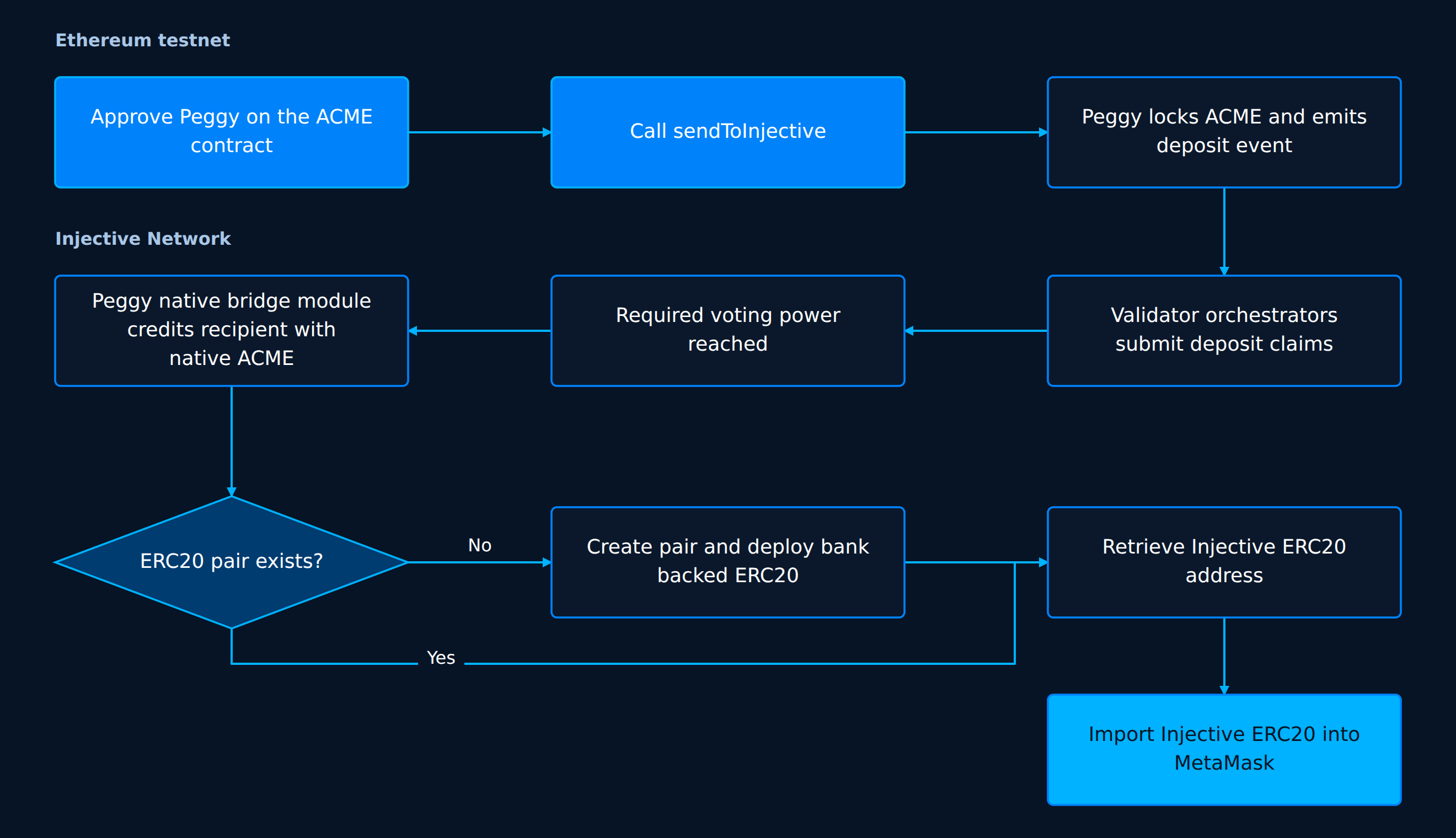
On Ethereum, approve the Peggy contract and call sendToInjective. The validator set attests the deposit and tokens under the bank denom peggy0x<TokenAddress> are minted to your Injective address. The first deposit of a given token creates the denom.
Pair creation for a peggy0x... denom is permissionless. Any account can send MsgCreateTokenPair for it, and the chain always deploys a FixedSupplyBankERC20 template. No custom contract is accepted on this path. Permissionless creation plus a forced template is a deliberate pairing of properties: anyone can make a bridged token usable in the EVM, and nobody can attach their own contract to a denom they do not control.
Peggy denoms have no TokenFactory admin. If a bridged token’s name, symbol or decimals are missing or incorrect, updating them requires a governance proposal carrying MsgSetDenomMetadata. Allowing any account to set metadata would let unrelated users assign misleading values before the token issuer. Creating an ERC20 pair grants no metadata authority, so plan any required metadata proposal before launch.
For RPCs and contracts visit Injective's Chain Portal
| Network | Bridge Contract |
|---|---|
| Mainnet | 0xF955C57f9EA9Dc8781965FEaE0b6A2acE2BAD6f3 |
| Testnet | 0x69A8b9F6e25b8D2550C3abc41E84929feaA2CBAF |
Cast Example
This example will use a hypothetical ACME ERC20 deployed on Ethereum Testnet
1. Prepare
cast wallet import sender-wallet --interactive
npm install @injectivelabs/sdk-ts

ETH_RPC="https://ETH_RPC" # Sepolia or Mainnet
PEGGY="PEGGY_PROXY_CONTRACT" # See above for bridge contracts
ETH_TOKEN="ACME_ETH_CONTRACT"
RECIPIENT="inj_BECH32_ADDRESS"
AMOUNT="10000000" # 10 ACME, for a 6 decimal token

cast chain-id --rpc-url "$ETH_RPC" # Verify chain id

RECIPIENT_HEX=$(
  node --input-type=module - "$RECIPIENT" <<'JS'
import { getEthereumAddress } from '@injectivelabs/sdk-ts/utils'
console.log(getEthereumAddress(process.argv[2]))
JS
)

DESTINATION=$(cast abi-encode "recipient(address)" "$RECIPIENT_HEX")
2. Approve & Deposit
We need to authorize the bridge to spend the 10 ACME.
cast send "$ETH_TOKEN" "approve(address,uint256)" "$PEGGY" "$AMOUNT" --account sender-wallet --rpc-url "$ETH_RPC" --json > approval.json

# Verify tx success, should see (status: "0x1")
jq '{transactionHash, status}' approval.json
Once the approval succeeds, the deposit can be executed by calling the sendToInjective function on the bridge contract:
cast send "$PEGGY" "sendToInjective(address,bytes32,uint256,string)" "$ETH_TOKEN" "$DESTINATION" "$AMOUNT" "" --account sender-wallet --rpc-url "$ETH_RPC" --json > deposit.json

# Verify tx success
jq '{transactionHash, status}' deposit.json
Peggy locks the ACME tokens on Ethereum. After validators attest the deposit, Injective credits the recipient under peggy0x<TokenAddress>, where <TokenAddress> is the checksummed Ethereum contract address. Use that exact casing when querying the denom.
3. Verify Delivery (Testnet is used for the example)
ENDPOINT="https://testnet.sentry.lcd.injective.network"

ETH_TOKEN=$(cast to-check-sum-address "$ETH_TOKEN")
DENOM="peggy${ETH_TOKEN}"

# Call an available endpoint to fetch the balance of the token by denom
curl --fail --silent --show-error --get "$ENDPOINT/cosmos/bank/v1beta1/balances/$RECIPIENT/by_denom" --data-urlencode "denom=$DENOM" | jq '.balance'
MetaMask Example
This example will default to using Ethereum Testnet
1. Prepare MetaMask
Under networks in MetaMask, select Sepolia (ensure test networks are enabled). The sender will need 10 ACME and sufficient (Sepolia) ETH for transaction fees. Prepare the same DESTINATION address used in the previous CLI example, which is the hexadecimal address that corresponds to the Bech32 native Injective address recipient (pad with 12 zero bytes to the left, with complete 0x...) in the field.
2. Approve Peggy
Open the ACME contract in Etherscan and under Contract -> Write Contract, connect MetaMask, and then approve.
Verify:
spender: Peggy proxy addressamount: 10000000
Finish and click Write, and then wait until the execution succeeds.
3. Deposit ACME
Open the Peggy proxy address on Etherscan again, and now under Contract -> Write as Proxy, connect the same MetaMask account and expand sendToInjective.
Verify:
_tokenContract: ACME contract address_destination: Hex encoded Injective (bech32) recipient address_amount: 10000000_data: ""
Finish and click Write to confirm and then wait until the execution succeeds.
Pair the Token
Once bridged, check to see if a pair already exists:
ENDPOINT="https://testnet.sentry.lcd.injective.network"

curl --fail --silent --show-error --get \
  "$ENDPOINT/injective/erc20/v1beta1/token_pair_by_denom" \
  --data-urlencode "bank_denom=$DENOM" |
  jq '.token_pair'
If there's no existing pair, create it:
See Adding keys to the keyring. The injectived keyring and Foundry keystore are separate; using sender-wallet in Foundry does not add it to injectived.
# Run once if sender-wallet is not already in your injectived keyring.
# Create a new key, or import an existing mnemonic using the alternative below.
injectived keys add sender-wallet
# Import instead of creating: injectived keys add sender-wallet --recover

# Fund this address with native INJ on Injective testnet before submitting.
injectived keys show sender-wallet -a

# Illustrative gas settings: validate for the target transaction
GAS_LIMIT=3500000
GAS_PRICE_INJ_BASE=500000000
GAS_PRICE="${GAS_PRICE_INJ_BASE}inj"

# Sender address does not need to be a specific admin role or owner
injectived tx erc20 create-token-pair "$DENOM" \
  --from sender-wallet \
  --chain-id injective-888 \
  --node https://testnet.sentry.tm.injective.network:443 \
  --gas "$GAS_LIMIT" \
  --gas-prices "$GAS_PRICE"
Optional: Add to MetaMask
Once the pair has been created, add Injective Testnet to MetaMask:
| Field | Value |
|---|---|
| Network Name | Injective Testnet |
| RPC URL | https://testnet.sentry.chain.json-rpc.injective.network |
| Chain ID | 1439 |
| Currency Symbol | INJ |
Then under networks, select Injective Testnet and import the ERC20 address returned by the successful pair creation.
Path C: an IBC originated token
IBC transfers bridge tokens over from other IBC connected chains to Injective's native bank module. All that remains is registering the ERC20 pair to make it accessible on Injective's EVM.
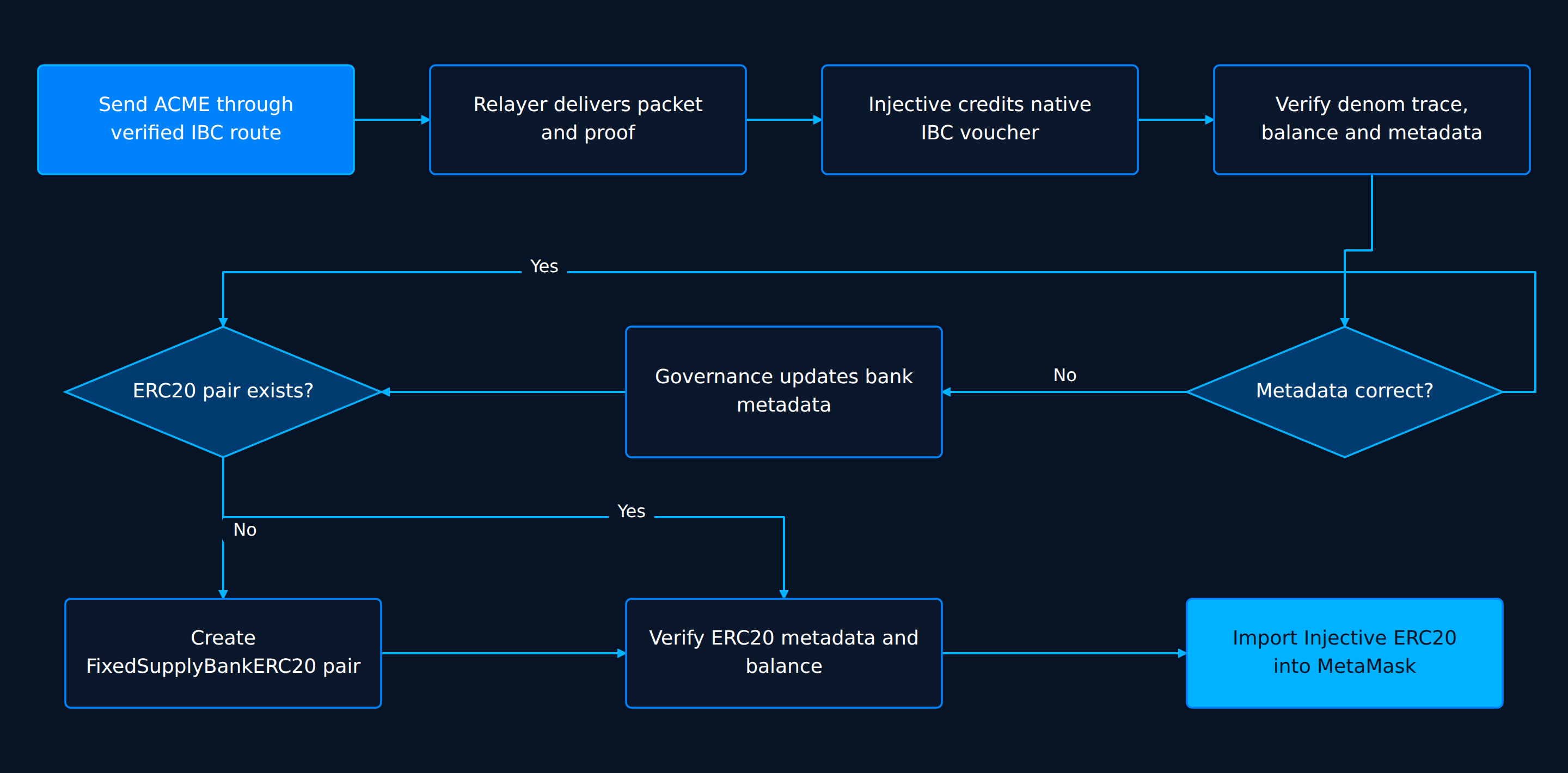
For the purpose of this example, we'll use ACME as a native IBC token on another chain, using 6 decimals, with an existing IBC transfer route and relayer infrastructure on Injective.
1. Execute IBC Transfer
On the native origin chain, using the source chain's wallet or installed CLI, submit an IBC transfer with the following values:
| Input | Value |
|---|---|
| Destination | Injective Testnet |
| Recipient | Bech32 inj... Address |
| Token | ACME denom on source chain |
| Amount | 10 ACME |
| Route | Verified IBC channel connecting source & destination chain |
For a comprehensive guide on executing IBC transfers, check out Keplr's IBC Guide. This initial source chain transaction initiates the transfer.
2. Verify Denom Received
ENDPOINT="https://testnet.sentry.lcd.injective.network"
RECIPIENT="inj..." #Bech32 testnet address on destination chain (Injective)

# Retrieve denom hash
curl --fail --silent --show-error "$ENDPOINT/cosmos/bank/v1beta1/balances/$RECIPIENT?pagination.limit=10000" |
  jq '.balances'

DENOM="ibc/VERIFIED_DENOM_HASH"
3. Verify and Configure Bank Metadata
# Query denom metadata
curl --fail --silent --show-error --get \
  "$ENDPOINT/cosmos/bank/v1beta1/denoms_metadata_by_query_string" \
  --data-urlencode "denom=$DENOM" |
  jq '.metadata'
A successful IBC transfer doesn't guarantee complete metadata availability. If decimals are missing or incorrect, then the solution is to submit a governance proposal MsgSetDenomMetadata for the IBC denom. Since there is no admin equivalent like with TokenFactory, only the gov module is authorized to make this change.
- Create or Retrieve ERC20 pair
# Verify if pair exists
curl --fail --silent --show-error --get \
  "$ENDPOINT/injective/erc20/v1beta1/token_pair_by_denom" \
  --data-urlencode "bank_denom=$DENOM" |
  jq '.token_pair'
If there's no existing pair, create it:
See Adding keys to the keyring. The injectived keyring and Foundry keystore are separate; using sender-wallet in Foundry does not add it to injectived.
# Run once if sender-wallet is not already in your injectived keyring.
# Create a new key, or import an existing mnemonic using the alternative below.
injectived keys add sender-wallet
# Import instead of creating: injectived keys add sender-wallet --recover

# Fund this address with native INJ on Injective testnet before submitting.
injectived keys show sender-wallet -a

# Illustrative gas settings: validate for the target transaction
GAS_LIMIT=3500000
GAS_PRICE_INJ_BASE=500000000
GAS_PRICE="${GAS_PRICE_INJ_BASE}inj"

# Sender address does not need to be a specific admin role or owner
injectived tx erc20 create-token-pair "$DENOM" \
  --from sender-wallet \
  --chain-id injective-888 \
  --node https://testnet.sentry.tm.injective.network:443 \
  --gas "$GAS_LIMIT" \
  --gas-prices "$GAS_PRICE"
Path D: Injective EVM token
This path is best for EVM developers looking to create an ERC20 directly on Injective's EVM. Simply extend Injective's BankERC20 to ensure proper compatibility with the Bank Precompile at 0x0000000000000000000000000000000000000064.
Natively, ERC20 tokens originating on Injective EVM share the following denom prefix: erc20:0x<InjectiveContractAddress>.
For ERC20 tokens deployed on Injective's EVM, there is no pairing required. The Bank precompile resolves denom metadata from the calling contract's address when there's no explicit pair in existence.
1. Choose contract implementation
ACME will use the MintBurnBankERC20, which inherits from Injective's BankERC20. The constructor accepts an initial deployment owner, the token name, symbol, and decimals. This metadata is supplied to the Bank Precompile, eliminating the need later to set denom metadata through an alternative authority like with previous paths.
A custom implementation is fine so long as it satisfies the requirement that balance and supply calls use the Bank precompile.
2. Fund the denom creation fee
The first mint of the token requires paying a creation fee, debited from the contract's INJ balance. This is distinct from gas paid by the sender for the transaction.
Query for the creation fee amount. At publication, this fee is 1 INJ.
ENDPOINT="https://testnet.sentry.lcd.injective.network"

curl --fail --silent --show-error \
  "$ENDPOINT/injective/erc20/v1beta1/params" |
  jq '.params.denom_creation_fee'
Since the constructor of the template contract is payable, include the fee as msg.value in the deployment transaction.
3. Deploy & Mint ACME
git clone --recurse-submodules \
  https://github.com/InjectiveLabs/solidity-contracts.git

cd solidity-contracts
forge build

cast wallet import acme-deployer --interactive

EVM_RPC="https://testnet.sentry.chain.json-rpc.injective.network"
OWNER=$(cast wallet address --account acme-deployer)

CREATION_FEE=$(
  curl --fail --silent --show-error \
    "$ENDPOINT/injective/erc20/v1beta1/params" |
    jq -r '.params.denom_creation_fee.amount'
)

# Confirm Injective testnet (chain ID is 1439)
cast chain-id --rpc-url "$EVM_RPC"

# Save deployed contract address from output
forge create src/MintBurnBankERC20.sol:MintBurnBankERC20 \
  --constructor-args "$OWNER" "Acme Token" "ACME" 6 \
  --value "$CREATION_FEE" \
  --account acme-deployer \
  --rpc-url "$EVM_RPC" \
  --broadcast
Validate the contract deployment:
TOKEN="0xDEPLOYED_ACME_ADDRESS"

# Mint 10 ACME to the owner, using 6 decimals
cast send "$TOKEN" "mint(address,uint256)" \
  "$OWNER" 10000000 \
  --account acme-deployer \
  --rpc-url "$EVM_RPC"
The mint transaction calls the Bank precompile, which pays the denom creation fee from the contract, and credits the recipient's balance in the native bank module.
4. Verify and Display Token Fetch Denom via contract address
TOKEN=$(cast to-check-sum-address "$TOKEN")
DENOM="erc20:${TOKEN}"
Optionally import TOKEN into MetaMask, and verify the account received the minted tokens.
Assets Outside Creation Paths
- INJ: Injective’s native currency also serves as the EVM gas token. It needs no ERC20 pair. Some application interfaces use the zero address to represent native currency; that convention does not make the zero address an ERC20 contract.
- wINJ: The documented WINJ9 implementation inherits BankERC20 and stores wrapped token balances through the Bank precompile. It is an MTS implementation, although wrapping and unwrapping remain separate operations between INJ and wINJ. See the wrapped INJ documentation.
- CW20: A CW20 contract is not directly registered as an MTS ERC20. Where an adapter creates a bank representation, follow the creation path for the resulting bank denom.
Who can update metadata
Wrong or missing metadata is the most common defect in a token launch, and the authority to correct it differs by path.
| Origin | Denom | Metadata authority |
|---|---|---|
| A: TokenFactory | factory/... |
The denom admin, MsgSetDenomMetadata, effective immediately |
| B: EVM Bridged (Peggy) | peggy0x... |
Governance proposal only |
| C: IBC | ibc/... |
Governance proposal only |
| D: Injective EVM | erc20:0x... |
The contract itself, via the precompile's setMetadata |
For EVM originated tokens, later metadata updates require an appropriately authorized function in the contract that calls setMetadata(name, symbol, decimals). The basic MintBurnBankERC20 template sets metadata in its constructor and does not expose a public metadata update function.
Verify before publishing
For TokenFactory, Peggy and IBC tokens, confirm that the registered pair points to the intended contract. For Path D, verify the erc20: denom derived from the contract address; an explicit pair registry entry is not required.
Check contract metadata:
ENDPOINT="https://testnet.sentry.lcd.injective.network"
EVM_RPC="https://testnet.sentry.chain.json-rpc.injective.network"
# Set these to the Injective ERC20 address and recipient for your chosen path
TOKEN="0xINJECTIVE_ERC20_ADDRESS"
RECIPIENT="inj_BECH32_ADDRESS"
DENOM="BANK_DENOM_FOR_YOUR_CHOSEN_PATH"

npm install @injectivelabs/sdk-ts

# Convert the same recipient to its EVM address
RECIPIENT_HEX=$(
  node --input-type=module - "$RECIPIENT" <<'JS'
import { getEthereumAddress } from '@injectivelabs/sdk-ts/utils'
console.log(getEthereumAddress(process.argv[2]))
JS
)

cast call "$TOKEN" "name()(string)" --rpc-url "$EVM_RPC"
cast call "$TOKEN" "symbol()(string)" --rpc-url "$EVM_RPC"
cast call "$TOKEN" "decimals()(uint8)" --rpc-url "$EVM_RPC"
Verify the decimals against the token’s intended precision. Zero decimals are valid for an indivisible token; they are incorrect for this ACME example.
curl --fail --silent --show-error --get \
  "$ENDPOINT/cosmos/bank/v1beta1/denoms_metadata_by_query_string" \
  --data-urlencode "denom=$DENOM" |
  jq '.metadata'

cast call "$TOKEN" "totalSupply()(uint256)" --rpc-url "$EVM_RPC"

curl --fail --silent --show-error --get \
  "$ENDPOINT/cosmos/bank/v1beta1/supply/by_denom" \
  --data-urlencode "denom=$DENOM" |
  jq '.amount'
Compare the recipient's balance:
cast call "$TOKEN" "balanceOf(address)(uint256)" \
  "$RECIPIENT_HEX" --rpc-url "$EVM_RPC"

curl --fail --silent --show-error --get \
  "$ENDPOINT/cosmos/bank/v1beta1/balances/$RECIPIENT/by_denom" \
  --data-urlencode "denom=$DENOM" |
  jq '.balance'
Here, RECIPIENT_HEX and RECIPIENT identify the same account in hexadecimal and Injective (bech32) address formats.
Compare raw integer values at the same chain height when investigating a discrepancy. Equal supply is a useful consistency check, but it does not prove that a custom contract delegates every balance operation to bank. Review its implementation and test transfers through both EVM and native transactions.
Operational Considerations
- Existing denom supply: Explicit pair creation requires bank supply to exist. Confirm supply before submitting
MsgCreateTokenPair. - Pair creation gas: Template deployment contributes to transaction gas. Use a limit validated against the target release since a contract deployment gas budget is not automatically the transaction’s consumed gas.
- Metadata: Confirm bank metadata and ERC20 reads before distributing wallet instructions. Peggy and IBC originated metadata corrections require governance.
- Supply returning to zero: The published mint logic charges the creation fee whenever the denom has no supply. Plan contract funding if minting can resume after all tokens are burned.
- Custom implementations: Registering a pair does not rewrite a contract. An implementation that keeps independent balances can remain inconsistent with bank.
- Pair deletion: The published
MsgDeleteTokenPairimplementation restricts deletion to governance and removes the mapping. It does not migrate or reconcile balances.
Publish token information
The MultiVM Token Standard documentation covers base contract deployment and precompile interface, and the EVM toolkit talk shows the full deployment and verification loop live. If you are launching or bridging a token and want a second set of eyes on the path choice, the #developers channel of the Injective Discord is the fastest route for support, and partners can go through their Injective contact directly.
After verifying chain state, submit the token to the registries used by the intended wallets and applications, starting with Injective token lists.
Registry entries provide discovery information such as logos and application labels. They do not replace bank metadata or change ERC20 behavior. Identify the asset in integration instructions using its network, bank denom and ERC20 address, because symbols alone are insufficient.
For implementation references, see the MultiVM Token Standard documentation, Bank precompile documentation, and Solidity contracts repository.